vaulted-agent v0.4.26
AI coding agents need secret values (API keys and related credentials).
Many setups put those values in local .env files.
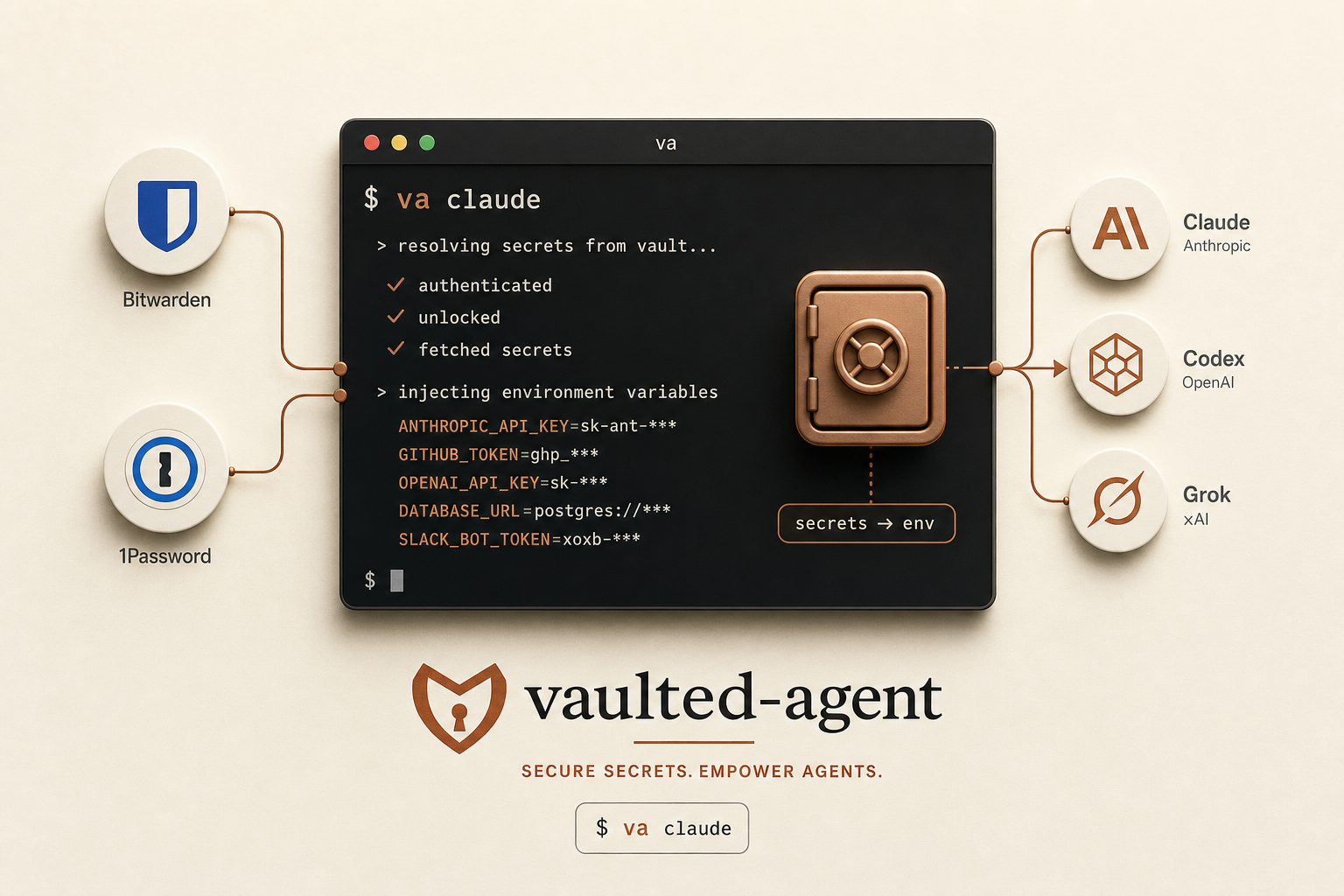
vaulted-agent is a launcher (va).
It is not a long-running daemon.
You select a harness. The launcher resolves a manifest
from a vault backend, builds the child environment,
and execs the agent. Secret values stay in that process.
They are not stored as a local secret file for each tool.
Context
A harness is a named launch profile
(harnesses.d/<name>.conf).
It names a backend, a manifest, and a command.
A manifest is often a refs file:
lines such as VAR=reference with no secret values on disk.
A manager token opens the vault
(BWS_ACCESS_TOKEN or OP_SERVICE_ACCOUNT_TOKEN).
The launcher uses that token only to resolve secret values.
The manager token must not appear in the child environment.
Auth mode is file (token on disk) or
prompt (paste on each launch).
An optional service user runs the agent under
sudo -u.
Terms and invariants: repo
CONTEXT.md
and AGENTS.md.
Install and start
-
Install the launcher
curl -fsSL https://vaultedagent.com/install.sh | bashSupported systems: macOS and Linux. The install script pins release
v0.4.26. Linux assets are static musl binaries. The installer can create harnesses for agents found onPATH. -
Configure a backend
va setup
va doctor
va setupselects a backend (Bitwarden SM, 1Password, pass, or sops), auth mode, optional service user, and workdir (calleror a fixed path).va doctorchecks the config as the same user a launch would use.va refreshwrites or updates a refs file for Bitwarden or 1Password. A refs file holds env var → reference lines only. Do not put secret values in a refs file. If the refs file is root-owned, refresh stops before vault work and printssudo /usr/local/bin/vaulted-agent refresh. Item menus accept ranges such as1-5, 9. Useva refresh --exclude '*_USERNAME'to skip field names. To edit a refs file with checks, runva edit-manifest(usessudoeditwhen you cannot write the file). -
Start a harness
va claude
va codex
va grok
va kimi
va agy
va muse
va muse --yolo
va bash
Muse runs with its configured permissions by default;
va muse --yoloforwards Muse’s native flag unchanged. With auth modeprompt, paste the manager token when asked. Useva -p grokonce to force prompt auth. A manifest override for this launch only:va -m readonly.env.tpl claude(launcher flag before the harness name). A conductor link does not accept-mor-H. For prompt auth under a conductor link, setVAULTED_AGENT_PROMPT_AUTH=1.
Recipes
Add one secret mapping to a harness
The harness points at a manifest. The vault holds the secret value. The refs file holds only the mapping (env var → reference). Do not put secret values in the refs file.
-
Create the secret in the vault
Bitwarden Secrets Manager: create a secret. Keep the name or UUID. 1Password: create an item field that the service account can read.
-
Map it in a refs file
# Merge unmapped secrets into the refs file va refresh # Or replace the refs file for one backend: va refresh --backend onepassword --replace --all # Edit the refs file with checks: va edit-manifest # or: va edit-manifest full.env.tpl # Or add one line under /etc/vaulted-agent/manifests/: # Bitwarden: OPENAI_API_KEY=name:openai-api-key # 1Password: OPENAI_API_KEY=op://Vault/openai/credential # Do not put sample op://… in comments. op inject reads comments. -
Set the harness manifest
Example in
/etc/vaulted-agent/harnesses.d/claude.conf:manifest = full.env.tpl. If you change only the secret value in the vault, run no command. The next launch fetches the new value. If you add a new mapping, runva refreshorva edit-manifest.
Use a manifest override for one launch
The harness still sets the command, workdir, and backend. The manifest override replaces the harness manifest for this launch. It does not merge with the configured manifest.
# Launcher flag before the harness name (not after)
va -m readonly.env.tpl claude
va --manifest=/etc/vaulted-agent/manifests/narrow.env.tpl claude --resume <id>

# Also with pick:
va -m readonly.env.tpl pick
A relative name is under /etc/vaulted-agent/manifests/.
A missing file fails before the agent starts.
The launcher prints the manifest in use.
Do not use -m under a conductor link
(*-conductor). That path has a fixed entitlement.
Use the direct va binary for a manifest override.
Commands
va                        # list harnesses
va agy                    # Antigravity CLI (workdir = caller)
va muse                   # Muse Code with its configured permissions
va muse --yolo            # inject secrets, then use Muse native yolo mode
va bash                   # secrets-injected shell (or va bash ./script.sh)
va doctor                 # config / syntax as the launch user (offline)
va secrets validate       # resolve every harness + extra_manifest (live)
va secrets validate --offline   # shape only; no manager token
va secrets list           # Bitwarden SM
va refresh                # write or update a refs file
va edit-manifest          # edit a refs file; check on save
va -m readonly.env.tpl claude   # manifest override for this launch
va auth-mode prompt       # or: file
va update                 # update binary and add missing detected harnesses
va update --sync-harnesses # add missing harnesses without a binary download
va run -m REFS --backend bitwarden -p -- your-cmd
sudo va uninstall
Upgrading from v0.4.23 or earlier: run va update,
then va update --sync-harnesses once to add missing harnesses such as Muse.
Later updates handle both steps automatically. Existing profiles are preserved.
New harnesses reuse the backend and manifest only when existing profiles agree;
otherwise they start without secrets and print a configuration reminder.
Bitwarden: use a Machine Account access token
(BWS_ACCESS_TOKEN) as the manager token.
Do not use your personal vault password.
Refs file lines look like OPENAI_API_KEY=name:openai-api-key.
1Password: put the service account token in
OP_SERVICE_ACCOUNT_TOKEN.
va refresh lists items, asks which to include, and writes
VAR=op://VAULT/ITEM/FIELD lines.
If you change only a secret value in the vault, run no command.
If you add a mapping, run va refresh or va edit-manifest.
va secrets validate is the pre-flight gate: it uses the same
resolve path as a launch and fails closed if the vault is unreachable.
Use --offline only for shape checks.
A harness may set alias = TARGET = SOURCE so one shared
refs file can serve agents that hardcode different meanings for the same name.
va doctor stays offline by design (syntax and config).
Doctor also flags op:// tokens in comments
(op inject resolves comments).
Auth mode:
prompt - paste the manager token on each launch (no token file).
file - read /etc/vaulted-agent/bws.env or
op.env.
Use -p on a direct va launch for one prompt.
Do not use -p under a conductor link for launcher prompt auth.
If a service user is set, va run is off unless
allow_run = yes in machine defaults.
An unreadable manager-token file is reported as permission denied, not as missing.
# From source instead of the one-liner:
git clone --branch v0.4.26 --depth 1 \
  https://github.com/JacobStephens2/vaulted-agent
cd vaulted-agent && sudo ./install.sh
Launch path
The harness is the unit of launch configuration.
It names a command and a manifest.
The launch path is: scrub → resolve → drop the manager token → exec.
If a service user is set, the launcher re-execs with
sudo -u first.
Secret values live in the child environment until the process exits.
Compare manifests to see which harness can resolve which references.
you $ va claude --resume <id>
      │
      ▼
  /usr/local/bin/vaulted-agent   (alias: va)
      ├─ optional sudo -u <service>    service-user re-exec
      ├─ cd workdir                    caller cwd by default
      ├─ scrub environment             child environment allowlist only
      ├─ load manager token            op.env / bws.env, or prompt (auth mode)
      ├─ resolve manifest              op inject / bws secret get / …
      ├─ drop manager token            must not enter the child environment
      └─ exec claude … --resume <id>
             └─ secret values stay here until exit
Properties
- One manager token on disk in auth mode
file, or none in auth modeprompt - Change a secret value in the vault; the next launch fetches it
- Manifests are plain files you can diff
- No secret material on the agent argv
va runfor a one-shot command without a harness filedoctorfails closed on bad or placeholder ref shapes (offline)secrets validateresolves every ref against the vault (live pre-flight)- A failed launch names the variables a bad resolve implicates
- Harness
alias = TARGET = SOURCErenames an injected secret for that child env only - Kimi vault inject works (OpenAI-compatible via env); interim
env = KIMI_CODE_LEGACY_FLAG = 1on kimi.conf until kimi-code#2746 doctorruns as the same user a launch would use- Unreadable manager-token files are not reported as missing
- Service-user re-exec keeps original argv for sudoers
- 1Password
refreshwrites inject-ready refs lines - Launch fails closed if the service user cannot traverse the workdir
- Manifest override:
va -m MANIFEST harness va edit-manifestchecks the refs file on savedoctorflagsop://in commentsrefreshchecks write access before vault work
Limits
- Auth mode
filekeeps one manager token on disk - The agent can read its own child environment
- A manifest limits which secret values resolve; it is not a sandbox
- With auth mode
file, the agent process can still open the token file if permissions allow it - Auth mode
promptneeds a TTY; nested agent launches often need auth modefile - With a service user,
va runstays off unlessallow_run = yes - Root on the host can still read all local files
Current release: v0.4.26 (Rust launcher since v0.4.0).
Design walkthrough:
One Vault, Three Agents.
More
To install without a pipe, download
install.sh, read it, then run it.
Pass flags after bash -s --, for example
--backend bitwarden --auth-mode prompt,
--user agent, or --no-auto-harness.
Full reference:
GitHub README.
Operator contract for agents:
AGENTS.md.
Session resume: va claude --resume <id>,
va codex resume <id>, va kimi --continue,
va agy --continue, va muse resume --last.